Love it or hate it, Facebook is still the number one social network and first-stop web destination for a majority of web users. Despite this, many entrepreneurs are still unsure of best practices for using the site to benefit their small business. The truth is, Facebook is one of the best ways to market your products and services, increase brand exposure, and offer improved customer service and engagement with the company. While it’s difficult to put a value on engagement, social media is a free (or very low cost) avenue for product promotion and customer interaction that should not be overlooked.

Showing posts with label Tips n Tricks. Show all posts
Showing posts with label Tips n Tricks. Show all posts
Troubleshooting: MEMORY
vaoinsight
9/22/2015
Comment!
PROBLEMS
WITH YOUR PC’S MEMORY, or RAM (Random Access Memory), can result in a variety
of issues, including seemingly random freezes, crashes, and system errors. When
you’re seeing these types of issues, there are no obvious error messages that
indicate something is wrong with the memory in your computer. Here, we’ll show you
how to discover if your RAM is the problem and give you some ways to fix it.
Speed Up Slow PCs Get Your PC Back To Working Like It Used To
vaoinsight
3/10/2015
Comment!
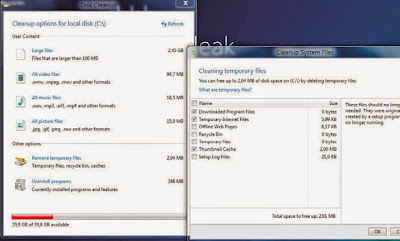
Windows 8 can help you clean up
temporary and system files that applications may leave on your computer.
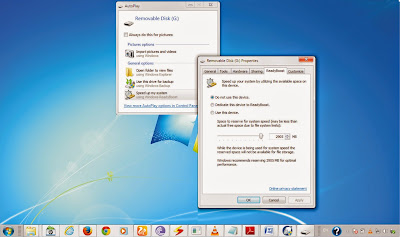
ReadyBoost can utilize flash
storage to improve the speed of your computer.
Speed is the key to making sure you can be
as efficient and productive as possible. It’s also important if you need to run
the newest software and applications. However, a variety of factors can affect
your computer’s performance and make it more difficult and more time-consuming
Best Christmax Gift Ideas for Her
vaoinsight
11/23/2013
Comment!
When Christmas roll around and it is time to busy with Christmas decoration and preparing gifts for families and friends. It is always not easy to find best gift for her and there are so-called best Christmas gifts recommended by shop are far away from satisfaction. Here are some most popular and creative Christmas gift ideas you should never miss, if you have spent all day in browsing online shops to intend to give her surprised and best gift.
Windows 8 Update, What To Expect From Windows 8.1
vaoinsight
10/30/2013
Comment!
Windows
8 is quickly approaching its first anniversary since launching in October
2012. According to the market analytics firm Net Applications,as we went to
press, its market share stood at 5.42%, behind Mac’s 7.28%, Windows XP’s 37.02%,
and Windows 7’s 44.5%. We’re going to go out on a limb here and
speculate that Microsoft had higher hopes for Windows 8’s first year than to
simply stomp Linux
(1.26%) and Windows Vista (4.26%). But it’s still very early in the operating
system’s lifespan, and many businesses make it a point to hold off on upgrading
to the next OS until after the first big update. If this is you or your
business, then this article is for you. Windows 8’s first big update is almost
upon us, and it’s called Windows 8.1. Read on for everything you need to know about
how Windows 8.1 makes a compelling case for an upgrade.
How to choose a blog name
vaoinsight
2/07/2013
Comment!
There are three simple rules to follow when choosing a blog name:
1. It must describe your blog: it is probable that lots of people will see a link to your blog before having the chance to actually read it (in search engines, for instance). Guess what, if just by looking at the name they can figure what the blog is about they will be more likely to visit it.
Anatomy of a PC Crash: 7 Scenarios, and How to Avoid Them
vaoinsight
1/30/2013
Comment!
Ah, the dreaded
Blue Screen of Death. If you know its common causes, you can usually stop it
before it incapacitate your system.
First there's a little stutter. Next a program hangs, and a funny noise creeps from your machine. Then that familiar blue screen slaps you in the face. Your computer just crashed, and all you can do is sit in the awkward silence of a restart, and hope it wasn't fatal.
Personal Advice for the Month!
vaoinsight
12/10/2012
Comment!
The best antivirus is common sense. Don't simply download software and click on links. Antivirus is more of a secondary precaution, like stopping a worm.
Three simple rules for buying a new laptop
vaoinsight
11/24/2012
2 Comments so far
What size of RAM do
you need? How much storage? And how important is the processor?
This is the time of year when friends, family members,
casual acquaintances, and major client stop me to ask about buying a
new PC.
"What should I get?" they ask. "What
do I need?" Also heard with increasing frequency: "Should I get a
tablet instead of a laptop?"
Wi-Fi Safety Tips
vaoinsight
11/21/2012
Comment!
1 Avoid open (public) Wi-Fi hotspots when sending or receiving sensitive data over the Internet.
2 Do not use unsecured Wi-Fi hotspots or hotspots that ask you to accept a certificate that your browser or OS deems invalid or unsafe.
10 Tip for Fighting Malware
vaoinsight
11/19/2012
Comment!
1. Make sure you are always running the latest version of the security software installed on your system.
2. If possible, set the security software to update automatically whenever necessary.
3. New viruses crop up daily, so update the virus definitions on your antivirus software before performing a scan.
4. If you’re heading out on a business trip with a new laptop, make sure security software is installed.
5. There are many free antivirus and firewall programs available online; check for reviews and reliability before downloading.
6. If you can’t find a firewall installed on your laptop, at least run Windows’ built-in firewall for basic protection.
7. Keep in mind that running multiple firewalls can cause conflicts, so don’t install a new firewall or start the Windows firewall unless you’re sure another one isn’t running.
8. Be vigilant with email attachments and such so you don’t inadvertently download malware in the first place.
9. Don’t fall for pop-up boxes that say something like “Your computer is infected! Click here!”
10 Know what programs are legitimately running on your computer so you don’t mistake them for malware.
2. If possible, set the security software to update automatically whenever necessary.
3. New viruses crop up daily, so update the virus definitions on your antivirus software before performing a scan.
4. If you’re heading out on a business trip with a new laptop, make sure security software is installed.
5. There are many free antivirus and firewall programs available online; check for reviews and reliability before downloading.
6. If you can’t find a firewall installed on your laptop, at least run Windows’ built-in firewall for basic protection.
7. Keep in mind that running multiple firewalls can cause conflicts, so don’t install a new firewall or start the Windows firewall unless you’re sure another one isn’t running.
8. Be vigilant with email attachments and such so you don’t inadvertently download malware in the first place.
9. Don’t fall for pop-up boxes that say something like “Your computer is infected! Click here!”
10 Know what programs are legitimately running on your computer so you don’t mistake them for malware.
10 Tips to FixedLlaptop
vaoinsight
11/17/2012
Comment!
1. Restarting your computer solves many common errors.
2. A BSOD doesn’t always mean something terrible has happened. Try restarting.
3. Search for a stop error on Microsoft’s Help And Support website. Often there is an easy fix.
4. Keep vents clear. They provide airflow for the internal fans and components and prevent overheating.
5. Scan for malware to ensure malicious software isn’t the cause of your problems.
6. Open the Task Manager and track down programs that are unresponsive or running in the background.
7. If your Laptop is frozen, try performing a cold shutdown.
8. Windows’ System Restore lets you restore your Laptop’s software to an earlier state when things ran smoothly.
9. If you are using an older Laptop, defragment the hard drive so the system does not get overtaxed.
10. Update your operating system and other software regularly to prevent future problems.
Tips For Employee Web Security
vaoinsight
11/12/2012
Comment!
An in-house IT staff can only do so much to keep your company’s network secure. Although employing anti-malware software on company computers and promoting best practices goes a long way, employees bear a great deal of responsibility when it comes down to using those best practices. Here are some tips to pass along.
Ten Tips for Staying Happy at Work
vaoinsight
9/20/2012
Comment!
The Balance Team, which specializes in professional- and personal-growth seminars for administrative and executive assistants in Fortune 1000 companies, suggests these 10 tips for staying content at work:
1. Keep Personal Problems Personal: When you're preoccupied with personal issues, it's difficult to concentrate or be happy at work, says Alison Rhodes, a founding partner of The Balance Team. By all means, make sure you have your kids covered in the event of an emergency, but realize that nobody's personal life is ever going to be completely problem-free. Just as you need to let go of work to enjoy your time at home, it's important to leave personal worries at home so you can focus and be productive at work.
How to Make the Internet Safe for Your Child
vaoinsight
8/08/2012
The Internet can be a good learning experience for children.But at the same time it can also be a dangerous place if they are left unmonitored. Here is how to make the browsing safe for them.
With You: Don’t ever leave your phone unattended, especial y at public places. Letting it lie in the open gives others an opportunity to access your data. Always carry your phone in the pocket or in the handbag.
With You: Don’t ever leave your phone unattended, especial y at public places. Letting it lie in the open gives others an opportunity to access your data. Always carry your phone in the pocket or in the handbag.
Subscribe to:
Posts (Atom)